Locations
A location in TimePally is a physical site where members work and clock in. Every member is assigned to a location, every device is registered at a location, and most reports can be filtered by location. Each location can also optionally carry a geofence (a GPS centre point and a radius) that TimePally uses to verify members are physically on-site when they clock in. Use this page to add new sites, rename existing ones, set up geofences, or remove sites you no longer use.
Getting there
Click Locations in the left sidebar (map-pin icon).
What you’ll see
- An editor form at the top with Name and Address fields, plus a geofence section (revealed when you turn geofencing on for the selected location).
- Three buttons: Save, Delete, Clear.
- A grid below showing every location for your organisation, with Name, Address, and a Geofence (On / Off) column.
Click any row to load it into the editor.
Common tasks
Add a new location
- Make sure no row is selected (click Clear if one is).
- Type a Name (required) and optionally an Address.
- Click Save.
Rename or change the address of a location
- Click the row in the grid.
- Edit the Name or Address field in the editor.
- Click Save.
Delete a location
- Click the row in the grid.
- Click Delete and confirm in the dialog.
Note: A location can only be deleted when nothing else depends on it. If the location still has devices registered or members assigned, the delete is blocked with an error notification (“Cannot delete location with associated devices” or “Cannot delete location with associated Members”). Move or remove those first.
Geofencing
A geofence ties a location to a real spot on the map. You pin the site’s GPS coordinates and choose a radius in metres; from then on, every clock-in and clock-out at that location is checked against the fence and tagged with the result. This is a flagging tool, not a barrier. TimePally records whether a member was inside or outside the zone, but it never stops them from clocking in. Use it to catch off-site or spoofed clock-ins after the fact, not to block them in the moment.
Geofencing is per-location and off by default. Set it up only on the sites where physical presence matters.
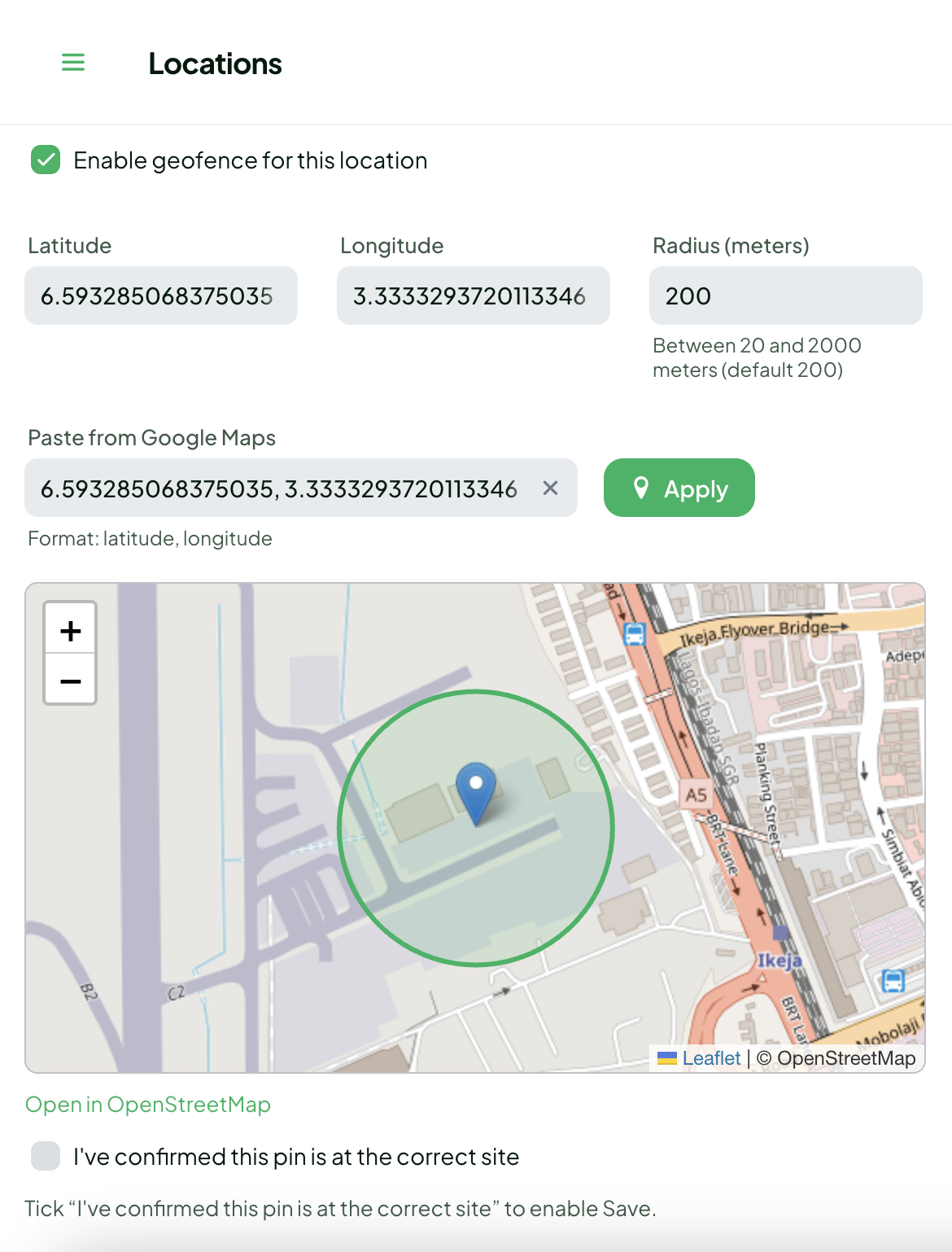
Set up a geofence
- Click the location’s row in the grid to load it into the editor.
- Tick Enable geofence for this location. (The checkbox is disabled until a location is selected.) The geofence section appears.
- Set the centre point, either way:
- Type the Latitude and Longitude directly (valid ranges −90…90 and −180…180), or
- Paste a
latitude, longitudepair (e.g.9.0764785, 7.4986235) into Paste from Google Maps and click Apply, and TimePally splits it into the two fields for you.
- Set the Radius (meters): default 200, allowed range 20 to 2000.
- Check the map preview: a green pin marks your coordinates and a green circle shows the radius. Use Open in OpenStreetMap to double-check the pin sits on the right building.
- Tick I’ve confirmed this pin is at the correct site. This is required; Save stays disabled until it’s ticked. (It clears itself automatically if you change the coordinates or radius afterwards, so you confirm the final pin.)
- Click Save.
Tip: to get coordinates from Google Maps, long-press the exact spot on the map, then copy the
lat, longnumbers that appear and paste them straight into Paste from Google Maps.
If you enter coordinates that fall outside Nigeria, TimePally shows a soft warning (“These coordinates are outside Nigeria; did you accidentally swap latitude and longitude?”). It’s only a nudge to catch the common lat/long swap mistake; it doesn’t block saving.
How clock-ins are evaluated
When a member clocks in or out, the kiosk reports its GPS fix (and how accurate that fix is). TimePally measures the distance from the location’s centre and tags the event with one of these statuses:
| Status | Meaning |
|---|---|
| Inside | The fix is within the radius. To be fair to imperfect GPS, the worst-case edge of the reading (distance minus the reported accuracy) still has to fall inside the circle. |
| Outside | The fix is beyond the radius even after that accuracy allowance. |
| Unknown | No usable fix, or the GPS accuracy is worse than the radius itself, too unreliable to judge. |
| Disabled | Geofencing isn’t enabled for that location, so no check is performed. |
| Mock | The device reported a fake / spoofed GPS location. This is flagged as a security concern regardless of distance. |
Two details worth knowing:
- Accuracy matters. If a member’s phone can only fix its position to ±300 m but your radius is 200 m, the result is Unknown, not Outside. TimePally won’t penalise a member for a vague reading. Indoors and in dense buildings, expect more Unknowns.
- Mock locations are caught. If the device is running a fake-GPS app, the clock-in is tagged Mock no matter where it claims to be.
What happens to an out-of-zone clock-in
Nothing is blocked. A clock-in tagged Outside or Mock is still accepted and recorded exactly like any other; the member is clocked in. The geofence status simply rides along with that attendance record so an admin can review it later. Geofencing is there to give you evidence and an audit trail, not to lock anyone out at the door.
Turning a geofence off
Untick Enable geofence for this location and click Save. The stored coordinates are cleared, and clock-ins at that location will report Disabled from then on. You can re-enable and re-pin it at any time.
Tips
- The number of locations you can create is capped by your subscription plan. When you hit the cap, the Save button shows a warning telling you the current limit. Upgrade the plan to add more: see Subscription. Trial accounts have no location cap.
- The Address field is a free-text human label and is completely independent of the geofence. Geofencing uses the explicit latitude/longitude you pin on the map, not the address text, so you can write the address however you like.
- Radius is in metres (20–2000, default 200). A tighter radius demands a better GPS fix; if members at a site keep getting Unknown results indoors, widen the radius.
- For geofencing to work, the kiosk device must have its Location permission granted. See Installing the App.
Note: Saving and deleting both require an active subscription. If yours has lapsed you’ll see a warning notification and the action won’t go through.
Related
- Members: reassign members before deleting their location
- Devices: move or unregister devices before deleting their location
- Installing the App: the kiosk needs Location permission for geofencing to work
- Dashboard: see attendance per location
- Privacy Policy: how precise GPS location at clock-in is handled
- Subscription: raise the location cap